Run REALITY and Hysteria2 on port 443 with Traefik, HAProxy, sing-box, and optional Pi-hole filtering
A complete, secret-free guide for sharing port 443 between Traefik web services, REALITY over TCP, and Hysteria2 over UDP, with direct Cloudflare DoH and Pi-hole-filtered client profiles backed by cloudflared upstream DoH.
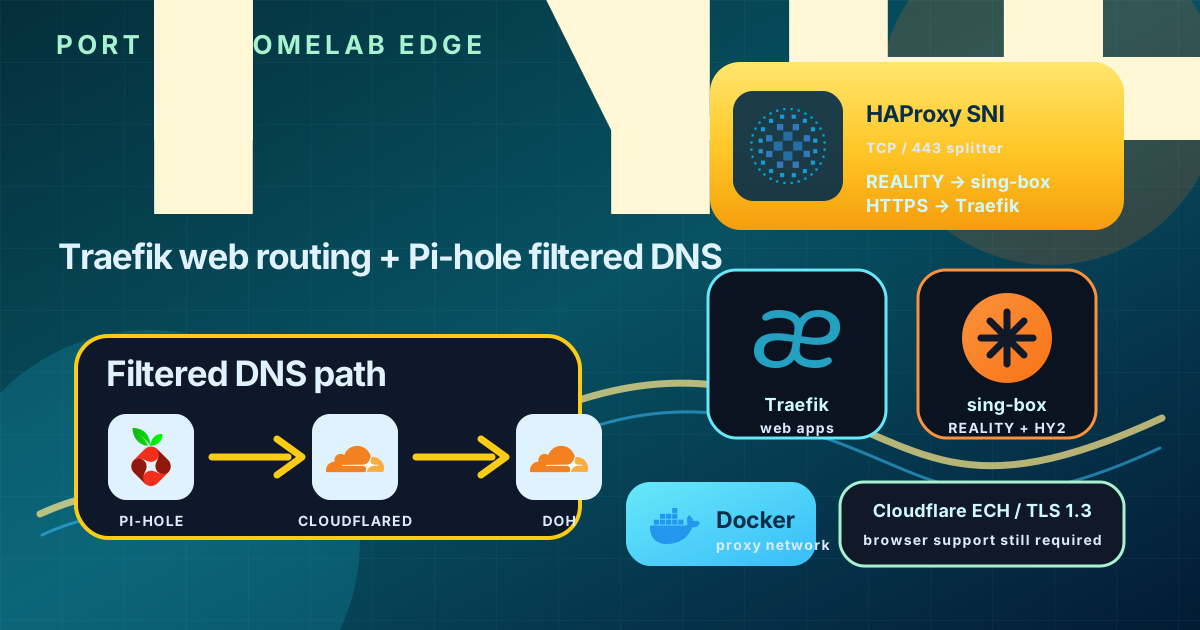
This guide documents a more advanced proxy layout than a normal reverse proxy. The goal is to keep Traefik serving public websites while also running two censorship-resistant proxy transports on the same public port number:
- REALITY / VLESS over TCP 443 for reliable TCP-based tunneling.
- Hysteria2 over UDP 443 for fast QUIC/UDP-based tunneling.
- Traefik still routes normal HTTPS websites.
- Pi-hole can optionally filter DNS inside the tunnel.
- cloudflared encrypts Pi-hole’s upstream DNS to Cloudflare DoH.
The final shape looks like this:
1
2
3
4
5
6
7
8
9
10
11
Internet
  │
  ├─ TCP/443
  │    ↓
  │  HAProxy SNI splitter
  │    ├─ SNI = www.microsoft.com  → sing-box REALITY backend
  │    └─ any other HTTPS SNI      → Traefik
  │
  └─ UDP/443
       ↓
     sing-box Hysteria2
Then client DNS can run in either mode:
1
2
Mode A: Direct secure DNS
Client → tunnel → Cloudflare DoH
or:
1
2
Mode B: Filtered DNS
Client → tunnel → Pi-hole → cloudflared → Cloudflare DoH
This post explains the technologies, why each part exists, what files are edited, how Traefik changes, and how to build both client profiles.
All domains, public IPs, UUIDs, keys, and passwords in this article are placeholders. Do not publish your real origin IP address, real domain, REALITY private key, Hysteria2 password, Cloudflare token, or Pi-hole password.
Related documentation
This setup builds on a few other homelab building blocks:
- Deploy Traefik as a Docker reverse proxy with Cloudflare DNS
- Deploy Pi-hole as private DNS with Docker and Headscale
- Deploy Headscale as a self-hosted coordination server
- Deploy Cloudflare Companion for Traefik DNS automation
Read those first if you do not already have Docker, Traefik, and a shared proxy network.
What each technology does
Traefik
Traefik is the HTTPS reverse proxy for normal web applications. It watches Docker labels, terminates TLS, and forwards requests to containers.
In a simple setup Traefik owns public ports 80 and 443 directly:
1
Internet → Traefik TCP/443 → web containers
In this setup, Traefik still routes websites, but it no longer owns public TCP/443 directly. HAProxy receives TCP/443 first and forwards normal HTTPS traffic to Traefik internally.
HAProxy SNI splitter
HAProxy is used here as a TCP router, not as an HTTP reverse proxy.
It peeks at the TLS ClientHello and reads the SNI field. Based on that SNI:
- If the SNI is the REALITY camouflage hostname, HAProxy forwards the connection to sing-box REALITY.
- Otherwise, HAProxy forwards it to Traefik.
This lets REALITY and Traefik share public TCP/443.
sing-box
sing-box is the proxy engine used for both server and client profiles. It can run multiple proxy protocols and has modern DNS routing support.
In this design sing-box provides:
- A VLESS + REALITY inbound for TCP/443 traffic routed by HAProxy.
- A Hysteria2 inbound for UDP/443.
- Client-side TUN mode profiles for Android or desktop.
- DNS routing rules for direct Cloudflare DoH or Pi-hole-filtered DNS.
REALITY
REALITY is a TLS-like transport designed to blend in with normal TLS traffic. The client uses a public decoy SNI such as www.microsoft.com, and the server validates REALITY keys and short IDs.
In this architecture:
1
2
3
4
5
Client REALITY connection
  ↓ TCP/443
HAProxy sees SNI www.microsoft.com
  ↓
sing-box REALITY backend
REALITY is useful when UDP is blocked or unreliable because it rides on TCP/443.
Hysteria2
Hysteria2 is a QUIC/UDP-based proxy protocol. It can be fast and resilient on lossy links, but it depends on UDP reachability.
It can share the same public port number because TCP and UDP are separate protocol families:
1
2
TCP/443 → HAProxy → Traefik or REALITY
UDP/443 → Hysteria2
If a mobile carrier, school, hotel, or corporate network blocks UDP/443, Hysteria2 may fail while REALITY still works.
Pi-hole
Pi-hole is DNS filtering. It can block ads, trackers, malware domains, or custom domains, and it can enforce SafeSearch using DNS rewrites.
In the filtered mode, the client sends DNS through the proxy tunnel to the server-side Pi-hole:
1
Client DNS → tunnel → Pi-hole → upstream resolver
cloudflared
cloudflared runs as Pi-hole’s encrypted upstream DNS forwarder. Pi-hole still receives and filters DNS first, including SafeSearch rewrites and local block rules. Only allowed queries are forwarded to cloudflared, which sends them to Cloudflare DoH over HTTPS.
This replaced the older encrypted-DNS forwarder in the final design because that stack repeatedly entered socket-saturation states under this workload. cloudflared’s DNS proxy mode is simpler here: one local listener, Cloudflare DoH upstreams, fewer moving parts.
1
Client → tunnel → Pi-hole filtering → cloudflared → Cloudflare DoH
Cloudflare DNS and ECH records
Cloudflare DoH is used for secure DNS transport and for HTTPS/SVCB records used by ECH-capable browsers.
ECH, or Encrypted ClientHello, is what modern Cloudflare pages refer to as Secure SNI. DNS can deliver the ECH bootstrap records, but the browser must also support ECH.
Important limitation: Cloudflare orange cloud
Cloudflare’s orange-cloud proxy is for HTTP and HTTPS websites. It does not proxy arbitrary REALITY or Hysteria2 traffic.
For REALITY and Hysteria2 client connections, the hostname must resolve to the server’s real origin address, or the client must use the server IP directly.
Recommended DNS behavior:
1
A/AAAA record for vpn.example.com → DNS-only / grey cloud
Do not put REALITY or Hysteria2 behind orange-cloud proxy mode.
Folder layout
Create a dedicated folder:
1
2
3
4
5
6
7
8
/home/ubuntu/xray-hysteria2/
├── docker-compose.yml
├── haproxy/
│   └── haproxy.cfg
├── reality-singbox/
│   └── config.json
└── hysteria2/
    └── sing-box-server.json
The folder name is historical. The REALITY backend in this guide uses sing-box, not Xray Core.
Step 1 — Create or verify the Docker network
Traefik, HAProxy, REALITY, Pi-hole, and cloudflared should share the same Docker network so containers can reach each other by name or internal IP.
1
docker network create proxy
If the network already exists, Docker will report that it exists. That is fine.
Step 2 — Change Traefik so it no longer owns public TCP/443
This is the most important Traefik edit.
Before this architecture, Traefik usually has:
1
2
3
ports:
  - "80:80"
  - "443:443"
That means Traefik binds public TCP/443 directly. HAProxy cannot also bind TCP/443.
For this design, edit this file:
1
/home/ubuntu/traefik/docker-compose.yml
Change Traefik’s HTTPS publish from public 443:443 to localhost-only 127.0.0.1:9443:443:
1
2
3
4
5
6
7
8
9
10
11
12
13
14
15
16
17
18
19
20
21
services:
  traefik:
    image: traefik:latest
    container_name: traefik
    restart: unless-stopped
    networks:
      proxy:
    ports:
      - "80:80"
      - "127.0.0.1:9443:443"
    volumes:
      - /etc/localtime:/etc/localtime:ro
      - /var/run/docker.sock:/var/run/docker.sock:ro
      - /home/ubuntu/traefik/data/traefik.yml:/traefik.yml:ro
      - /home/ubuntu/traefik/data/acme.json:/acme.json
      - /home/ubuntu/traefik/data/config.yml:/config.yml:ro
    env_file: .env

networks:
  proxy:
    external: true
Why this works:
- Public HTTP
80remains Traefik’s job. - Public HTTPS
443moves to HAProxy. - Traefik still listens on container port
443inside Docker. - HAProxy forwards normal HTTPS traffic to
traefik:443over the Docker network. - The localhost
9443publish is optional but useful for local debugging.
If your Compose file is under a host-mounted path, use absolute volume paths. Relative bind mounts can accidentally create directories where files should be mounted, causing errors such as
read /traefik.yml: is a directory.
Restart Traefik after the edit:
1
2
cd /home/ubuntu/traefik
docker compose up -d
Step 3 — Add the HAProxy SNI splitter
Create this file:
1
/home/ubuntu/xray-hysteria2/haproxy/haproxy.cfg
Use this config:
global
  log stdout format raw local0
  maxconn 4096

defaults
  log global
  mode tcp
  option tcplog
  timeout connect 5s
  timeout client  2m
  timeout server  2m

frontend https_443
  bind :443
  tcp-request inspect-delay 5s
  tcp-request content accept if { req_ssl_hello_type 1 }

  # REALITY clients use this camouflage SNI.
  use_backend reality_backend if { req.ssl_sni -i www.microsoft.com }

  # Everything else stays normal HTTPS through Traefik.
  default_backend traefik_https

backend reality_backend
  server reality reality-singbox:10443

backend traefik_https
  server traefik traefik:443
What happens here:
- HAProxy accepts TCP/443.
- It waits briefly for the TLS ClientHello.
- It reads SNI without terminating TLS.
- It sends REALITY camouflage traffic to sing-box.
- It sends all normal website traffic to Traefik.
HAProxy does not need TLS certificates for this role because it is not decrypting HTTPS.
Step 4 — Create the REALITY sing-box server config
Create this file:
1
/home/ubuntu/xray-hysteria2/reality-singbox/config.json
Use placeholder values first:
1
2
3
4
5
6
7
8
9
10
11
12
13
14
15
16
17
18
19
20
21
22
23
24
25
26
27
28
29
30
31
32
33
34
35
36
37
38
39
40
41
42
43
44
45
46
47
48
49
50
{
  "log": {
    "level": "info",
    "timestamp": true
  },
  "inbounds": [
    {
      "type": "vless",
      "tag": "reality-in",
      "listen": "::",
      "listen_port": 10443,
      "users": [
        {
          "name": "user-reality",
          "uuid": "00000000-0000-4000-8000-000000000000",
          "flow": "xtls-rprx-vision"
        }
      ],
      "tls": {
        "enabled": true,
        "server_name": "www.microsoft.com",
        "reality": {
          "enabled": true,
          "handshake": {
            "server": "www.microsoft.com",
            "server_port": 443
          },
          "private_key": "REPLACE_WITH_REALITY_PRIVATE_KEY",
          "short_id": [
            "0123456789abcdef"
          ],
          "max_time_difference": "1m"
        }
      }
    }
  ],
  "outbounds": [
    {
      "type": "direct",
      "tag": "direct"
    },
    {
      "type": "block",
      "tag": "block"
    }
  ],
  "route": {
    "final": "direct"
  }
}
Generate your REALITY keypair with sing-box:
1
docker run --rm ghcr.io/sagernet/sing-box:latest generate reality-keypair
Generate a UUID:
1
uuidgen
Generate a short ID:
1
openssl rand -hex 8
Replace these placeholders:
| Placeholder | Meaning |
|---|---|
00000000-0000-4000-8000-000000000000 | Client UUID |
REPLACE_WITH_REALITY_PRIVATE_KEY | Server-side REALITY private key |
0123456789abcdef | REALITY short ID |
www.microsoft.com | Camouflage SNI and handshake server |
The client receives the public key, not the private key.
Step 5 — Create the Hysteria2 server config
Create this file:
1
/home/ubuntu/xray-hysteria2/hysteria2/sing-box-server.json
Use this template:
1
2
3
4
5
6
7
8
9
10
11
12
13
14
15
16
17
18
19
20
21
22
23
24
25
26
27
28
29
30
31
32
33
34
35
36
37
38
39
40
41
42
43
44
45
46
47
48
49
50
51
52
{
  "log": {
    "level": "info",
    "timestamp": true
  },
  "inbounds": [
    {
      "type": "hysteria2",
      "tag": "hy2-in",
      "listen": "::",
      "listen_port": 443,
      "users": [
        {
          "name": "user-hysteria2",
          "password": "REPLACE_WITH_LONG_RANDOM_PASSWORD"
        }
      ],
      "obfs": {
        "type": "salamander",
        "password": "REPLACE_WITH_LONG_RANDOM_OBFS_PASSWORD"
      },
      "tls": {
        "enabled": true,
        "certificate_path": "/etc/sing-box/certs/hy2.crt",
        "key_path": "/etc/sing-box/certs/hy2.key"
      },
      "masquerade": {
        "type": "string",
        "status_code": 404,
        "headers": {
          "content-type": [
            "text/html; charset=utf-8"
          ]
        },
        "content": "<!doctype html><html><head><title>404 Not Found</title></head><body><h1>404 Not Found</h1></body></html>"
      }
    }
  ],
  "outbounds": [
    {
      "type": "direct",
      "tag": "direct"
    },
    {
      "type": "block",
      "tag": "block"
    }
  ],
  "route": {
    "final": "direct"
  }
}
Hysteria2 needs TLS certificate files. For a private proxy endpoint, a self-signed certificate can be enough when the client profile sets insecure: true.
Example certificate generation:
1
2
3
4
5
6
mkdir -p /home/ubuntu/sing-box/certs
openssl req -x509 -newkey rsa:2048 -nodes \
  -keyout /home/ubuntu/sing-box/certs/hy2.key \
  -out /home/ubuntu/sing-box/certs/hy2.crt \
  -days 3650 \
  -subj "/CN=vpn.example.com"
Generate long random passwords:
1
2
openssl rand -base64 32
openssl rand -base64 32
Use different values for the Hysteria2 user password and Salamander obfuscation password.
Step 6 — Create the combined Docker Compose file
Create this file:
1
/home/ubuntu/xray-hysteria2/docker-compose.yml
Use this Compose file:
1
2
3
4
5
6
7
8
9
10
11
12
13
14
15
16
17
18
19
20
21
22
23
24
25
26
27
28
29
30
31
32
33
34
35
36
37
38
39
40
41
42
43
services:
  haproxy-sni:
    image: haproxy:lts-alpine
    container_name: haproxy-sni
    restart: unless-stopped
    user: "0:0"
    ports:
      - "443:443/tcp"
    networks:
      - proxy
    volumes:
      - /home/ubuntu/xray-hysteria2/haproxy/haproxy.cfg:/usr/local/etc/haproxy/haproxy.cfg:ro
    security_opt:
      - no-new-privileges:true

  reality-singbox:
    image: ghcr.io/sagernet/sing-box:latest
    container_name: reality-singbox
    restart: unless-stopped
    user: "0:0"
    networks:
      - proxy
    command: ["run", "-c", "/etc/sing-box/config.json"]
    volumes:
      - /home/ubuntu/xray-hysteria2/reality-singbox/config.json:/etc/sing-box/config.json:ro
    security_opt:
      - no-new-privileges:true

  hysteria2:
    image: ghcr.io/sagernet/sing-box:latest
    container_name: hysteria2
    restart: unless-stopped
    network_mode: host
    command: ["run", "-c", "/etc/sing-box/config.json"]
    volumes:
      - /home/ubuntu/xray-hysteria2/hysteria2/sing-box-server.json:/etc/sing-box/config.json:ro
      - /home/ubuntu/sing-box/certs:/etc/sing-box/certs:ro
    security_opt:
      - no-new-privileges:true

networks:
  proxy:
    external: true
Why Hysteria2 uses host networking:
- It needs UDP/443 exposed directly.
- TCP/443 is already published by HAProxy.
- TCP and UDP can both use port
443at the same time.
Start the stack:
1
2
cd /home/ubuntu/xray-hysteria2
docker compose up -d
Check containers:
1
docker ps --format 'table {{.Names}}\t{{.Status}}\t{{.Ports}}'
Expected result:
1
2
3
4
haproxy-sni       Up ...   0.0.0.0:443->443/tcp
reality-singbox   Up ...
hysteria2         Up ...
traefik           Up ...   0.0.0.0:80->80/tcp, 127.0.0.1:9443->443/tcp
Step 7 — Pi-hole and cloudflared mode
This section is optional. Skip it if you only want direct Cloudflare DoH from the client.
For the final filtered setup, Pi-hole does local filtering first and cloudflared handles only encrypted upstream DNS afterwards. The DNS path is:
1
Client → tunnel → Pi-hole → dnsmasq SafeSearch/blocking → cloudflared → Cloudflare DoH
This keeps Pi-hole useful while avoiding the socket-saturation problems that can make Cloudflare checks and normal browsing unstable in heavier encrypted-DNS forwarder setups. A stable Pi-hole container IP also makes mobile client profiles easier to maintain.
Edit this file:
1
/home/ubuntu/pihole/docker-compose.yml
Use this shape for the DNS services:
1
2
3
4
5
6
7
8
9
10
11
12
13
14
15
16
17
18
19
20
21
22
23
24
25
26
27
28
29
30
31
32
33
34
35
36
37
38
services:
  pihole:
    image: pihole/pihole
    container_name: pihole
    restart: unless-stopped
    environment:
      FTLCONF_misc_etc_dnsmasq_d: "true"
      FTLCONF_dns_upstreams: "cloudflared#53"
      FTLCONF_dns_listeningMode: "all"
    volumes:
      - /home/ubuntu/pihole/pihole:/etc/pihole/
      - /home/ubuntu/pihole/dnsmasq.d:/etc/dnsmasq.d/
    depends_on:
      - cloudflared
    networks:
      proxy:
        ipv4_address: 172.18.0.33

  cloudflared:
    image: cloudflare/cloudflared:2025.10.1
    container_name: cloudflared
    restart: unless-stopped
    command:
      - proxy-dns
      - --address
      - 0.0.0.0
      - --port
      - "53"
      - --upstream
      - https://1.1.1.1/dns-query
      - --upstream
      - https://1.0.0.1/dns-query
    networks:
      - proxy

networks:
  proxy:
    external: true
Pin the cloudflared image instead of using latest. Newer cloudflared releases removed proxy-dns, so pinning keeps this design reproducible.
The client profiles below use Pi-hole at:
1
172.18.0.33:53
That is an internal Docker network address, not a public IP address.
SafeSearch rewrites
Create this file:
1
/home/ubuntu/pihole/dnsmasq.d/99-safesearch.conf
Example SafeSearch rules:
host-record=forcesafesearch.google.com,216.239.38.120
host-record=restrict.youtube.com,216.239.38.120
host-record=restrictmoderate.youtube.com,216.239.38.119
host-record=strict.bing.com,204.79.197.220
host-record=safe.duckduckgo.com,52.142.126.100
host-record=search.brave.com,3.33.205.124

cname=www.google.com,forcesafesearch.google.com
cname=google.com,forcesafesearch.google.com
cname=www.bing.com,strict.bing.com
cname=bing.com,strict.bing.com
cname=duckduckgo.com,safe.duckduckgo.com
cname=www.duckduckgo.com,safe.duckduckgo.com
cname=www.youtube.com,restrictmoderate.youtube.com
cname=m.youtube.com,restrictmoderate.youtube.com
cname=youtube.googleapis.com,restrictmoderate.youtube.com
cname=youtubei.googleapis.com,restrictmoderate.youtube.com
Use host-record for Brave’s search.brave.com force-safe IP. Do not use a broad address=/search.brave.com/... rule for Brave, because that also catches safe.search.brave.com and can cause HSTS certificate errors.
If you want to block search engines that do not support network-level SafeSearch, keep those rules in a separate file, for example:
1
/home/ubuntu/pihole/dnsmasq.d/98-search-bypass-blocks.conf
Then add only the domains you intentionally want to block:
address=/qwant.com/0.0.0.0
address=/qwant.com/::
address=/yahoo.com/0.0.0.0
address=/yahoo.com/::
address=/you.com/0.0.0.0
address=/you.com/::
address=/kagi.com/0.0.0.0
address=/kagi.com/::
Restart Pi-hole:
1
2
cd /home/ubuntu/pihole
docker compose up -d
Verify upstream:
1
docker exec pihole pihole-FTL --config dns.upstreams
Expected:
1
[ cloudflared#53 ]
Verify cloudflared is alive:
1
docker logs --tail 50 cloudflared
Expected log lines include:
1
2
Starting DNS over HTTPS proxy server address=dns://0.0.0.0:53
Adding DNS upstream url=https://1.1.1.1/dns-query
Client mode A — direct Cloudflare DoH, no Pi-hole filtering
Use this when you want the client to send DNS directly over Cloudflare DoH through the tunnel. This mode is simple and usually passes Cloudflare’s secure DNS test, but it bypasses Pi-hole filtering.
REALITY direct-DoH client
Use this as a template:
1
2
3
4
5
6
7
8
9
10
11
12
13
14
15
16
17
18
19
20
21
22
23
24
25
26
27
28
29
30
31
32
33
34
35
36
37
38
39
40
41
42
43
44
45
46
47
48
49
50
51
52
53
54
55
56
57
58
59
60
61
62
63
64
65
66
67
68
69
70
71
72
73
74
75
76
77
78
79
80
81
82
83
84
85
86
87
{
  "log": {
    "level": "info",
    "timestamp": true
  },
  "dns": {
    "servers": [
      {
        "type": "https",
        "tag": "cf-doh",
        "server": "1.1.1.1",
        "server_port": 443,
        "path": "/dns-query",
        "detour": "proxy"
      }
    ],
    "rules": [
      {
        "action": "route",
        "server": "cf-doh"
      }
    ],
    "final": "cf-doh",
    "strategy": "ipv4_only"
  },
  "inbounds": [
    {
      "type": "tun",
      "tag": "tun-in",
      "interface_name": "tun0",
      "address": [
        "172.19.0.1/30"
      ],
      "auto_route": true,
      "strict_route": true,
      "route_exclude_address": [
        "203.0.113.10/32"
      ]
    }
  ],
  "outbounds": [
    {
      "type": "vless",
      "tag": "proxy",
      "server": "203.0.113.10",
      "server_port": 443,
      "uuid": "00000000-0000-4000-8000-000000000000",
      "flow": "xtls-rprx-vision",
      "tls": {
        "enabled": true,
        "server_name": "www.microsoft.com",
        "utls": {
          "enabled": true,
          "fingerprint": "chrome"
        },
        "reality": {
          "enabled": true,
          "public_key": "REPLACE_WITH_REALITY_PUBLIC_KEY",
          "short_id": "0123456789abcdef"
        }
      },
      "packet_encoding": "xudp"
    },
    {
      "type": "direct",
      "tag": "direct"
    },
    {
      "type": "block",
      "tag": "block"
    }
  ],
  "route": {
    "auto_detect_interface": true,
    "rules": [
      {
        "port": 53,
        "action": "hijack-dns"
      },
      {
        "action": "sniff"
      }
    ],
    "final": "proxy",
    "default_domain_resolver": "cf-doh"
  }
}
Hysteria2 direct-DoH client
1
2
3
4
5
6
7
8
9
10
11
12
13
14
15
16
17
18
19
20
21
22
23
24
25
26
27
28
29
30
31
32
33
34
35
36
37
38
39
40
41
42
43
44
45
46
47
48
49
50
51
52
53
54
55
56
57
58
59
60
61
62
63
64
65
66
67
68
69
70
71
72
73
74
75
76
77
78
79
80
81
82
83
{
  "log": {
    "level": "info",
    "timestamp": true
  },
  "dns": {
    "servers": [
      {
        "type": "https",
        "tag": "cf-doh",
        "server": "1.1.1.1",
        "server_port": 443,
        "path": "/dns-query",
        "detour": "proxy"
      }
    ],
    "rules": [
      {
        "action": "route",
        "server": "cf-doh"
      }
    ],
    "final": "cf-doh",
    "strategy": "ipv4_only"
  },
  "inbounds": [
    {
      "type": "tun",
      "tag": "tun-in",
      "interface_name": "tun0",
      "address": [
        "172.19.0.1/30"
      ],
      "auto_route": true,
      "strict_route": true,
      "route_exclude_address": [
        "203.0.113.10/32"
      ]
    }
  ],
  "outbounds": [
    {
      "type": "hysteria2",
      "tag": "proxy",
      "server": "203.0.113.10",
      "server_port": 443,
      "password": "REPLACE_WITH_HYSTERIA2_PASSWORD",
      "obfs": {
        "type": "salamander",
        "password": "REPLACE_WITH_SALAMANDER_PASSWORD"
      },
      "tls": {
        "enabled": true,
        "alpn": [
          "h3"
        ],
        "insecure": true
      }
    },
    {
      "type": "direct",
      "tag": "direct"
    },
    {
      "type": "block",
      "tag": "block"
    }
  ],
  "route": {
    "auto_detect_interface": true,
    "rules": [
      {
        "port": 53,
        "action": "hijack-dns"
      },
      {
        "action": "sniff"
      }
    ],
    "final": "proxy",
    "default_domain_resolver": "cf-doh"
  }
}
Client mode B — Pi-hole-filtered DNS with encrypted upstream
This is the more complete homelab mode.
Normal DNS goes to Pi-hole through the tunnel:
1
Client → tunnel → 172.18.0.33:53 → Pi-hole
Pi-hole filters the request and forwards allowed queries to cloudflared. cloudflared then sends upstream DNS to Cloudflare DoH.
The final daily profile keeps DNS on the Pi-hole path. Do not bypass Pi-hole for Cloudflare test domains if you want filtering, SafeSearch, and local block rules to remain consistent.
Why use the server IP instead of a domain in this profile?
When DNS itself is inside the tunnel, the client must be able to connect to the tunnel endpoint before DNS works. If the outbound server is a hostname, the client may need DNS before the tunnel exists.
That creates a bootstrap loop:
1
2
Need DNS to start tunnel
Need tunnel to reach DNS
The filtered profiles therefore use a literal server IP such as:
1
203.0.113.10
Use your own origin IP privately. Do not publish it.
REALITY Pi-hole-filtered client
1
2
3
4
5
6
7
8
9
10
11
12
13
14
15
16
17
18
19
20
21
22
23
24
25
26
27
28
29
30
31
32
33
34
35
36
37
38
39
40
41
42
43
44
45
46
47
48
49
50
51
52
53
54
55
56
57
58
59
60
61
62
63
64
65
66
67
68
69
70
71
72
73
74
75
76
77
78
79
80
81
82
83
84
85
86
87
88
{
  "log": {
    "level": "info",
    "timestamp": true
  },
  "dns": {
    "servers": [
      {
        "type": "tcp",
        "tag": "pihole",
        "server": "172.18.0.33",
        "server_port": 53,
        "detour": "proxy"
      }
    ],
    "rules": [
      {
        "action": "route",
        "server": "pihole"
      }
    ],
    "final": "pihole",
    "strategy": "ipv4_only"
  },
  "inbounds": [
    {
      "type": "tun",
      "tag": "tun-in",
      "interface_name": "tun0",
      "address": [
        "172.19.0.1/30"
      ],
      "auto_route": true,
      "strict_route": true,
      "route_exclude_address": [
        "203.0.113.10/32"
      ]
    }
  ],
  "outbounds": [
    {
      "type": "vless",
      "tag": "proxy",
      "server": "203.0.113.10",
      "server_port": 443,
      "uuid": "00000000-0000-4000-8000-000000000000",
      "flow": "xtls-rprx-vision",
      "tls": {
        "enabled": true,
        "server_name": "www.microsoft.com",
        "utls": {
          "enabled": true,
          "fingerprint": "chrome"
        },
        "reality": {
          "enabled": true,
          "public_key": "REPLACE_WITH_REALITY_PUBLIC_KEY",
          "short_id": "0123456789abcdef"
        },
        "min_version": "1.3",
        "max_version": "1.3"
      },
      "packet_encoding": "xudp"
    },
    {
      "type": "direct",
      "tag": "direct"
    },
    {
      "type": "block",
      "tag": "block"
    }
  ],
  "route": {
    "auto_detect_interface": true,
    "rules": [
      {
        "port": 53,
        "action": "hijack-dns"
      },
      {
        "action": "sniff"
      }
    ],
    "final": "proxy",
    "default_domain_resolver": "pihole"
  }
}
Hysteria2 Pi-hole-filtered client
1
2
3
4
5
6
7
8
9
10
11
12
13
14
15
16
17
18
19
20
21
22
23
24
25
26
27
28
29
30
31
32
33
34
35
36
37
38
39
40
41
42
43
44
45
46
47
48
49
50
51
52
53
54
55
56
57
58
59
60
61
62
63
64
65
66
67
68
69
70
71
72
73
74
75
76
77
78
79
80
81
82
83
84
85
86
87
{
  "log": {
    "level": "info",
    "timestamp": true
  },
  "dns": {
    "servers": [
      {
        "type": "tcp",
        "tag": "pihole",
        "server": "172.18.0.33",
        "server_port": 53,
        "detour": "proxy"
      }
    ],
    "rules": [
      {
        "action": "route",
        "server": "pihole"
      }
    ],
    "final": "pihole",
    "strategy": "ipv4_only"
  },
  "inbounds": [
    {
      "type": "tun",
      "tag": "tun-in",
      "interface_name": "tun0",
      "address": [
        "172.19.0.1/30"
      ],
      "auto_route": true,
      "strict_route": true,
      "route_exclude_address": [
        "203.0.113.10/32"
      ]
    }
  ],
  "outbounds": [
    {
      "type": "hysteria2",
      "tag": "proxy",
      "server": "203.0.113.10",
      "server_port": 443,
      "password": "REPLACE_WITH_HYSTERIA2_PASSWORD",
      "obfs": {
        "type": "salamander",
        "password": "REPLACE_WITH_SALAMANDER_PASSWORD"
      },
      "tls": {
        "enabled": true,
        "alpn": [
          "h3"
        ],
        "insecure": true,
        "min_version": "1.3",
        "max_version": "1.3",
        "ech": {
          "enabled": true
        }
      }
    },
    {
      "type": "direct",
      "tag": "direct"
    },
    {
      "type": "block",
      "tag": "block"
    }
  ],
  "route": {
    "auto_detect_interface": true,
    "rules": [
      {
        "port": 53,
        "action": "hijack-dns"
      },
      {
        "action": "sniff"
      }
    ],
    "final": "proxy",
    "default_domain_resolver": "pihole"
  }
}
Why the Pi-hole client uses TCP DNS
DNS over UDP through REALITY/VLESS can be unreliable in some sing-box/TUN combinations. TCP DNS through the tunnel is slower on paper but more predictable.
This is why the filtered profile uses:
1
2
3
4
5
6
7
{
  "type": "tcp",
  "tag": "pihole",
  "server": "172.18.0.33",
  "server_port": 53,
  "detour": "proxy"
}
The client sends DNS to Pi-hole over TCP through the selected proxy outbound.
Validation commands
Run these checks from a temporary client container or a Linux machine with sing-box available.
Validate JSON syntax
1
sing-box check -c client.json
Confirm web traffic exits through the server
1
curl -4 https://ifconfig.me
Expected: your server’s public IP, not your local ISP IP.
Confirm Pi-hole blocking
1
dig @172.19.0.2 doubleclick.net A +short
Expected:
1
0.0.0.0
Confirm SafeSearch
1
dig @172.19.0.2 www.google.com A +short
Expected to include:
1
forcesafesearch.google.com.
Confirm HTTPS/SVCB records
1
dig @172.19.0.2 www.google.com HTTPS +short
Expected: a non-empty HTTPS/SVCB answer.
Confirm ECH bootstrap records
1
dig @172.19.0.2 cloudflare-ech.com HTTPS +short
Expected to include:
1
ech=...
Confirm TLS 1.3
1
curl -s https://one.one.one.one/cdn-cgi/trace | grep -E 'http=|tls=|sni='
Expected:
1
2
http=http/2
tls=TLSv1.3
The sni= value depends on the HTTP client and browser ECH support. A browser can pass Cloudflare’s Secure SNI/ECH test only if it supports ECH and receives valid HTTPS/SVCB records.
Troubleshooting
Hysteria2 does not connect
Check whether UDP/443 is blocked.
Hysteria2 uses UDP. Many restricted networks allow TCP/443 but block or throttle UDP/443. If Hysteria2 fails on one network but REALITY works, the server config may be fine and the network may be blocking UDP.
Server-side signs of a working Hysteria2 connection:
1
docker logs -f hysteria2
Expected log pattern:
1
inbound/hysteria2[hy2-in]: [user-hysteria2] inbound connection to example.com:443
If there are no logs when the client connects, check firewall, security group, router, and provider UDP ingress rules.
REALITY does not connect
Check HAProxy routing:
1
docker logs -f haproxy-sni
Check REALITY logs:
1
docker logs -f reality-singbox
Make sure these values match on client and server:
- UUID
- REALITY public/private key pair
- short ID
- flow
- camouflage SNI
- server port
Websites stop loading in Pi-hole mode
First check Pi-hole:
1
docker exec pihole dig @127.0.0.1 example.com A +short
Then check cloudflared:
1
docker logs --tail 100 cloudflared
If cloudflared is not running, restart the DNS stack:
1
2
cd /home/ubuntu/pihole
docker compose up -d
Then retest Pi-hole resolution.
Cloudflare Secure DNS fails but Pi-hole filtering works
Cloudflare’s help page checks whether its resolver canaries are resolved through Cloudflare secure DNS. In Pi-hole-filtered mode, your DNS path is:
1
Browser → sing-box → Pi-hole → cloudflared → Cloudflare DoH
That path can still pass the Cloudflare Browser Check when the browser actually uses this DNS path. If Secure DNS fails while Pi-hole filtering works, check Android Private DNS, Chrome Secure DNS overrides, and whether the app is excluded from the VPN/TUN profile.
Secure SNI / ECH fails
ECH requires three things:
- The website supports ECH.
- DNS returns HTTPS/SVCB records containing
ech=. - The browser supports and enables ECH.
The sing-box profile can help with DNS delivery, but the browser still decides whether ECH is used.
Security notes
Do not publish:
- server origin IP address
- Cloudflare API token
- REALITY private key
- REALITY client UUID if it is active
- REALITY short ID if it is active
- Hysteria2 password
- Salamander obfuscation password
- Pi-hole admin password
- full production client profiles
Use placeholders in public documentation. Store real client files privately.
Summary
This architecture lets one server keep normal HTTPS websites online while also offering two proxy transports:
1
2
3
4
5
TCP/443 → HAProxy SNI splitter
  ├─ REALITY camouflage SNI → sing-box REALITY
  └─ normal websites        → Traefik

UDP/443 → sing-box Hysteria2
For DNS, use one of two modes:
1
2
Direct mode:
Client → tunnel → Cloudflare DoH
1
2
Filtered mode:
Client → tunnel → Pi-hole → cloudflared → Cloudflare DoH
REALITY is the reliable TCP fallback. Hysteria2 is the fast UDP option. Traefik continues serving websites. Pi-hole adds filtering when wanted. HAProxy is the small TCP-layer component that makes sharing port 443 possible.